


![[Image: PcCl3ga.jpg]](https://i.imgur.com/PcCl3ga.jpg)
![[Image: gjTsm61.gif]](https://i.imgur.com/gjTsm61.gif)
GLaDOS/Portal inspired piece. |
 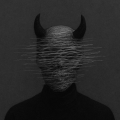 (Jan 11, 2020 06:00 PM)Cyam Wrote: How exactly did you make this? I took a source image (in this case a dark portrait photograph of a woman) and then ran it through some image processing code to generate the distorted lines effect (look up Processing - it's a software for writing code to manipulate images) and then I took the resulting black and while stripey image, and put it into after effects for some colorization, glow and other effects. Then I took it into photoshop for some final color correction, added textures/text etc. That's pretty much it. (Jan 13, 2020 12:43 PM)SkullTraill Wrote: I took a source image (in this case a dark portrait photograph of a woman) and then ran it through some image processing code to generate the distorted lines effect (look up Processing - it's a software for writing code to manipulate images) and then I took the resulting black and while stripey image, and put it into after effects for some colorization, glow and other effects. Then I took it into photoshop for some final color correction, added textures/text etc. Might be a stupid question, but why was the image ever processed in After Effects? It's not an animation, I feel like Photoshop would've been the better tool for colorization and glow.   (Jan 13, 2020 05:56 PM)Ser Wrote: Might be a stupid question, but why was the image ever processed in After Effects? It's not an animation, I feel like Photoshop would've been the better tool for colorization and glow.
(Jan 14, 2020 03:22 AM)Herbert Wrote: love it, would make for some nice cover art I could have done it better. Like the other guy said, I think the text is too bright and steals a bit too much attention from the image. The literature itself is from the song "Still Alive" from portal, which this whole piece was based on. (Jan 14, 2020 03:30 AM)LoremIpsum Wrote: Looks amazing! I'd place the text a little bit below the woman's image, perhaps make it less bright too. Usually, when I add text to an artwork, I like to keep it centered, and share the limelight along with the imagery, instead of being relegated to the edges of the canvas where it's just out of place or seems like an after thought. However, this time I do think the text is a bit too bright and pushes the imagery more into the background than I'd like. It was a mistake. 
I really liked the way you did it. I have been always a fan of glitch effect.
9/10. (Jan 15, 2020 07:26 PM)vyactor Wrote: I really liked the way you did it. I have been always a fan of glitch effect. Thanks, mang, I appreciate it. I do quite a bit of glitch art, if you check my posts you should be able to find most of it.     (Jan 13, 2020 12:43 PM)SkullTraill Wrote: I took a source image (in this case a dark portrait photograph of a woman) and then ran it through some image processing code to generate the distorted lines effect (look up Processing - it's a software for writing code to manipulate images) and then I took the resulting black and while stripey image, and put it into after effects for some colorization, glow and other effects. Then I took it into photoshop for some final color correction, added textures/text etc. Really cool that you used Processing, awesome to see a range of tools being used. Shows that you don't just have to use Photoshop or Sketch for everything, super creative of you and shows your skill that you're comfortable across so much software. Sick work as usual man <3 ![[Image: HMHpl76.gif]](https://i.imgur.com/HMHpl76.gif) |
|
|
| Possibly Related Threads... | |||
| Thread / Author | Replies | Views | Last Post |
| [HF V3ndors] by MotusoraJul 11, 2026 11:44 AM | 2 | 86 |
Jul 11, 2026 11:44 AM Last Post: Motusora |
| by LifeMay 12, 2019 12:44 AM | 14 | 326 |
May 12, 2019 12:44 AM Last Post: Life |
| by owenhackzApr 16, 2019 09:49 AM | 10 | 205 |
Apr 16, 2019 09:49 AM Last Post: Mix |



![[Image: 3f86f13104.gif]](https://puu.sh/F2XnG/3f86f13104.gif)


![[Image: b3lgdu8.png]](https://i.imgur.com/b3lgdu8.png)